

Zkteco
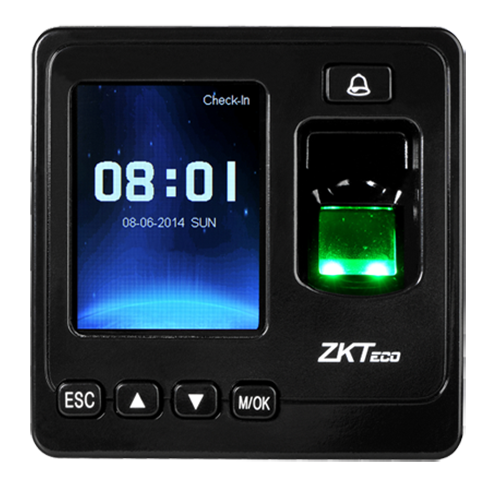
ZKteco SF100 Fingerprint Access Control Terminal
ZKteco SF100 Fingerprint Access Control Terminal
Couldn't load pickup availability
ZKTeco SF100 Fingerprint Access Control & Time Attendance Terminal
The ZKTeco SF100 is an IP-based fingerprint terminal designed to operate in both network and standalone modes. In network mode, the terminal can connect with compatible software for access control and time attendance management.
The SF100 features a reliable ZK Optical Fingerprint Sensor and supports TCP/IP, RS485, and USB Host communication. Its Wiegand input and output interfaces provide flexible integration with external controllers and readers.
With support for access control interfaces such as electric lock, door sensor, alarm, exit button, and doorbell, the SF100 is suitable for offices, commercial premises, institutions, and other access-controlled environments.
Key Features
- IP-based fingerprint terminal for network and standalone operation.
- ZK Optical Fingerprint Sensor with 500 DPI resolution.
- ZKFinger V10.0 fingerprint algorithm.
- 2.4-inch TFT color LCD display with 320 × 240 resolution.
- Fingerprint capacity of up to 1,500 users.
- Record capacity of up to 80,000 records.
- TCP/IP, RS485, and USB Host communication.
- Wiegand input and output for flexible integration.
- Supports electric lock, door sensor, alarm, exit button, and doorbell.
- Auxiliary input available for linkage functions.
- Compact design suitable for space-constrained installations.
Product Advantages
- Can operate in both network and standalone modes.
- Suitable for fingerprint-based access control and attendance applications.
- Wiegand input and output provide integration flexibility.
- Supports connection with external access control controllers.
- Large fingerprint and transaction record capacity.
- Multiple communication interfaces for installation flexibility.
- Compact 90 × 90 × 34.5 mm design.
- Supports Master & Slave configuration using Wiegand connectivity.
- Anti-passback function can be utilized for enhanced access security.
Technical Specifications
| Specification | Details |
|---|---|
| Model | SF100 |
| Product Type | Fingerprint Access Control & Time Attendance Terminal |
| Display | 2.4-inch TFT Color Screen |
| Display Resolution | 320 × 240 |
| Fingerprint Sensor | ZK Optical Sensor (500 DPI) |
| Algorithm Version | ZKFinger V10.0 |
| Fingerprint Capacity | 1,500 |
| Record Capacity | 80,000 |
| Communication | TCP/IP, RS485, USB Host |
| Wiegand Signal | Wiegand Input & Output |
| Access Control Interface | Electric Lock, Door Sensor, Alarm, Exit Button, Doorbell |
| Auxiliary Input | 1 × Auxiliary Input for Linkage Function |
| Power Supply | DC 12V / 3A |
| Operating Temperature | 0°C to 45°C (32°F to 113°F) |
| Operating Humidity | 20% to 80% |
| Dimensions | 90 × 90 × 34.5 mm (W × L × H) |
Access Control Features
- Electric lock interface.
- Door sensor support.
- Exit button connection.
- Alarm interface.
- Doorbell interface.
- Wiegand input and output.
- Auxiliary input for linkage functions.
- Master & Slave configuration support through Wiegand.
- Anti-passback function for enhanced security.
Communication & Integration
TCP/IP Connectivity
Connect the SF100 to a network for communication with compatible access control and time attendance management software.
Wiegand Input & Output
Wiegand connectivity allows the SF100 to work with external controllers and third-party access control systems. Two SF100 terminals can also be configured for a Master & Slave solution.
RS485 & USB Host
RS485 and USB Host interfaces provide additional communication and connectivity options for supported installations.
Applications
- Corporate Offices
- Factories & Manufacturing Units
- Warehouses
- Schools & Educational Institutions
- Commercial Buildings
- Retail Stores
- Small & Medium Businesses
- Access-Controlled Entry Points
- Employee Time Attendance Systems
- Standalone Access Control Installations
Why Choose SF100?
- Reliable fingerprint-based authentication.
- Supports both standalone and network operation.
- Compact and professional terminal design.
- Flexible Wiegand integration with external controllers.
- Supports Master & Slave access control configuration.
- Suitable for both access control and time attendance applications.
- Large capacity of 1,500 fingerprints and 80,000 records.
- Multiple communication interfaces including TCP/IP and RS485.
Package Includes
- 1 × SF100 Fingerprint Terminal
Share